Play Training
Request Rate Adjustment
Number of Guide Steps: 4
This Rate Adjustment request empowers users to propose changes to CPM or rates within their campaign details. Whether seeking an increase or decrease based on specific circumstances, a designated Lee team member will review and update rates post-approval.
This ensures a streamlined process for adjusting rates and allows users to continue their campaign selling with confidence.

- 1. Open the Campaign Support Area
- 2. Click the Request Rate Adjustment Workflow
- 3. Complete the Rate Adjustment Request Form
- 4. Click Save, Then Submit
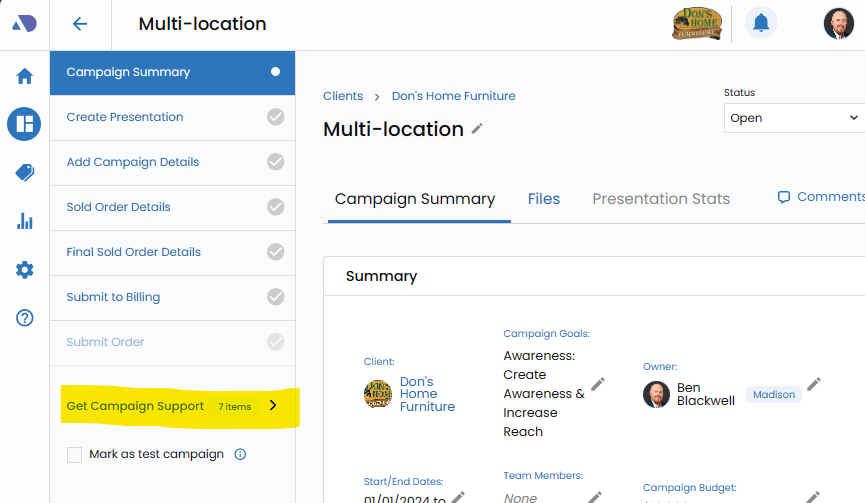
Open the Campaign Support Area.
Begin your the process by navigating to the Campaign Summary Screen within Vision VX. Once there, dive into the Campaign Support Area, a dedicated space designed to provide users with comprehensive support and access to expert guidance.
Click the Request Rate Adjustment Workflow.
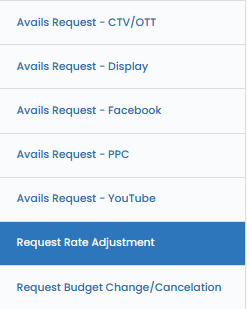
Within the Campaign Support Area, locate and click on the "Request Rate Adjustment " workflow.
This specialized workflow serves as the gateway to requesting a rate adjustment in your campaign details screen.
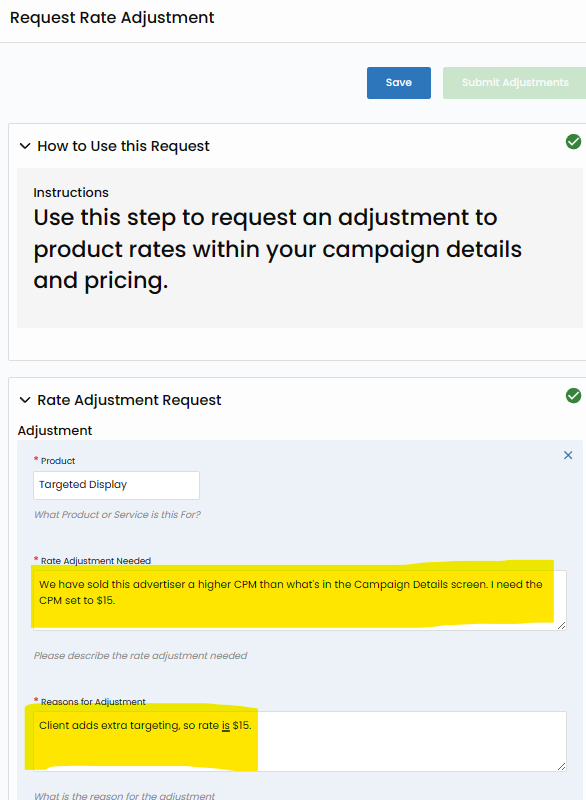
Complete the Rate Adjustment Request Form.
This request empowers users to propose changes to CPM or rates within their campaign details. Whether seeking an increase or decrease based on specific circumstances, a designated Lee team member will review and update rates post-approval. This ensures a streamlined process for adjusting rates and allows users to continue their campaign selling with confidence.
Click Save, Then Submit.
First Save your Edits with the Save button.
Now, with your Avails Request Form duly completed and saved, take the next decisive step by clicking the "Submit" button.
This action initiates the process of transmitting your request directly to the adept Lee team members who can approve and update your campaign details