Play Training
Set Campaign Owner (Sales Rep)
Number of Guide Steps: 3
In Vision VX, the flexibility to designate a campaign owner other than yourself adds a layer of collaboration and delegation to the campaign management process.
While you are automatically set as the default owner, modifying this ownership is a straightforward procedure.
Here's a step-by-step guide on how to change the owner:

- 1. Initiate Owner Change:
- 2. Utilize the Plus Button
- 3. Set New Owner
Initiate Owner Change:.
To change the owner, locate the 'X' mark next to your name or the current owner's name on the campaign management screen. This 'X' mark acts as the trigger to release the current ownership.
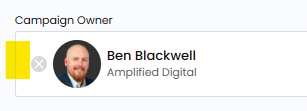
Utilize the Plus Button.
After clicking the 'X' mark, click the 'Plus' button to initiate the process of assigning a new owner. This action opens a search box where you can explore and select from the list of available team members.
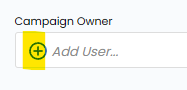
Set New Owner.
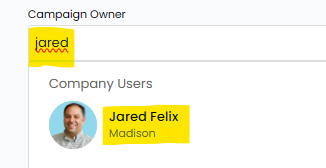
Begin Searching by Name:
Start typing the name of the individual you wish to assign as the new owner in the search box. Vision VX will provide suggestions based on your input, making it easy to locate the desired team member.
Select the New Owner:
From the search results, select the name of the individual who will take on the role of the new campaign owner. This selection is crucial for ensuring that the campaign is managed and overseen by the appropriate team member.