Play Training
Set Campaign Budget
Number of Guide Steps: 2
Diving into the realm of campaign budgeting is a critical step in crafting a targeted and effective marketing strategy within Vision VX. The budget you set plays a pivotal role in guiding the platform to recommend the most suitable products and services, aligning seamlessly with your client's overarching goals. Here's a comprehensive guide on how to adeptly set campaign budgets:
Understanding the Significance of Campaign Budgets:
Campaign budgets are more than just financial allocations; they serve as the cornerstone of designing a tailored solution within Vision VX. The budget amount you specify acts as a directive, shaping the recommendations generated by the platform to achieve your client's specific goals.
Flexibility in Budget Adjustments:
It's important to note that campaign budgets are not set in stone. You have the flexibility to edit them at any point in the sales process before finalizing and submitting the campaign order for billing. This adaptability ensures that your budget can evolve in response to changing needs and insights throughout the campaign lifecycle.

- 1. Inputting Total Campaign Budget
- 2. Easy Budget Buttons for Quick Adjustments
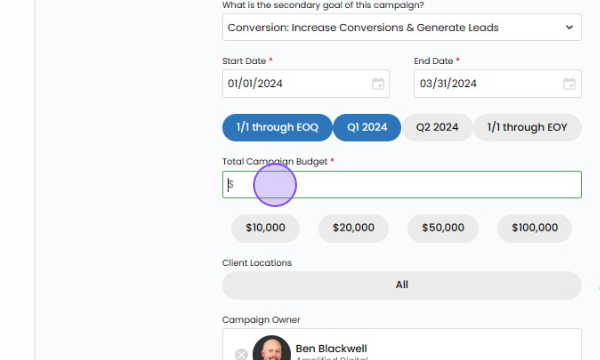
Inputting Total Campaign Budget.
While on the campaign creation screen, input the total budget for the campaign. This total represents the amount to be invested over the duration of the campaign, spanning from the start date to the end date. The assumption is that this total budget will be distributed evenly across the months encompassed by the campaign.
Easy Budget Buttons for Quick Adjustments.
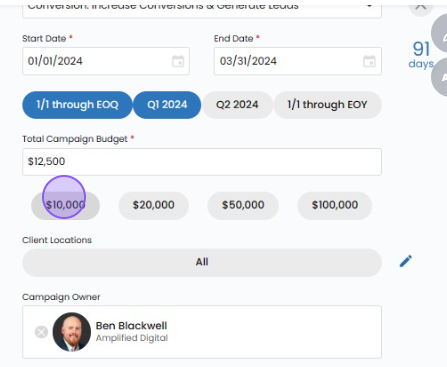
To streamline the budget-setting process, take advantage of the easy budget buttons available. These shortcuts allow you to quickly add a budget number without the need for manual input, ensuring a swift and efficient configuration of your campaign's financial parameters.